Tutorial: build the desk
One running app, eleven short chapters, one new primitive each. You start with a working refund-desk agent and finish with a scheduled, Slack-connected, memory-having, staff-employing one — with evals gating every change and every consequential action holding at the signal until a person clears it.
No API key is needed until chapter 3 (and even then it’s optional — everything except “talk to a real model” works keyless).
1 · Open the desk
rails new desk -m https://raw.githubusercontent.com/danielstpaul/silas/main/templates/desk.rb
cd desk && bin/dev
Open http://localhost:3000 — the signal board:
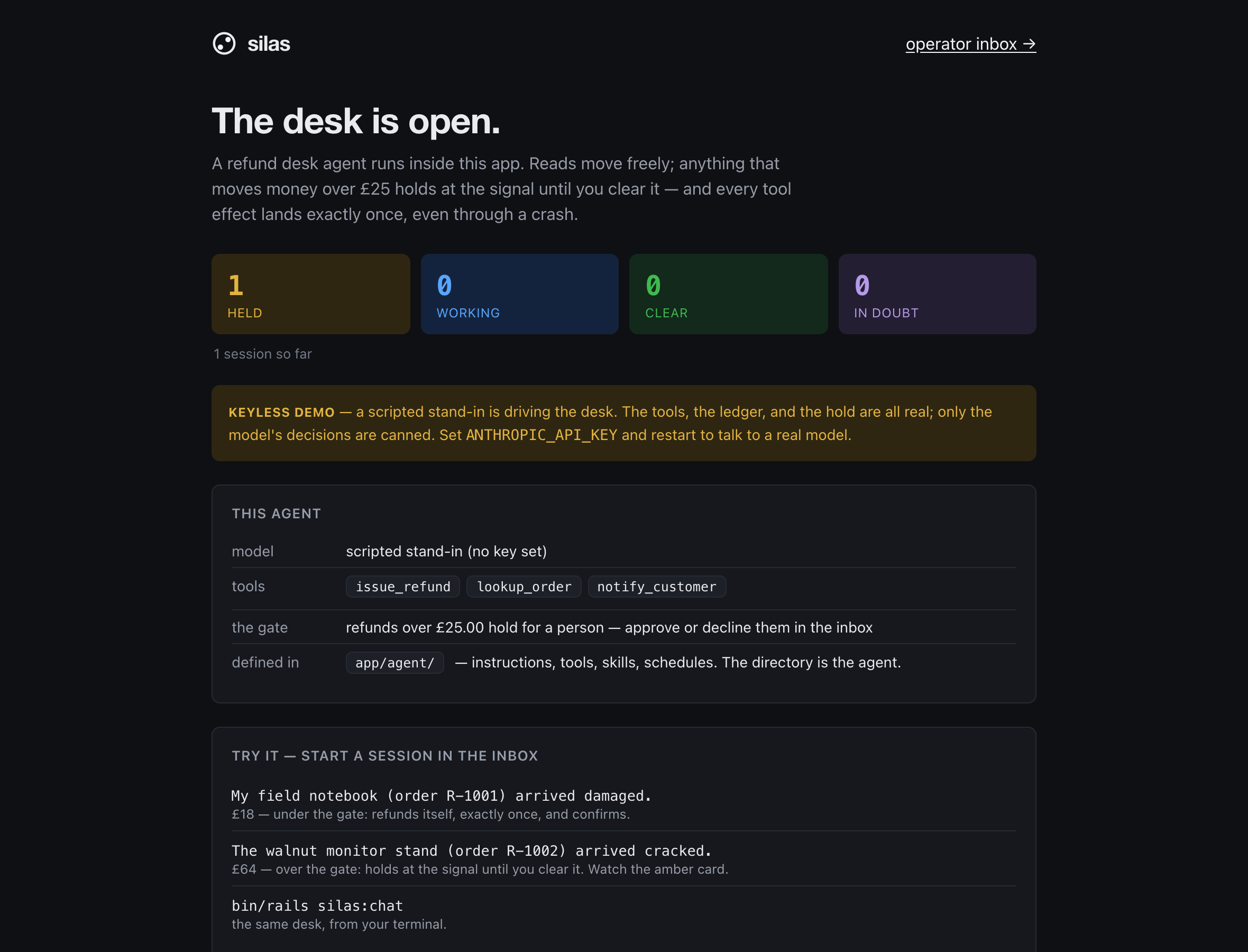
Then operator inbox → and start a session:
The walnut monitor stand (order R-1002) arrived cracked.
Watch the trace: lookup_order clears, then issue_refund holds — an
amber card at the top of the session, and the turn costs nothing while it
waits. Approve it. The turn resumes exactly where it stopped, notifies the
customer, and answers. Now check the till:
bin/rails runner 'puts Refund.count' # => 1
Try the £18 story too (order R-1001) — under the gate, it never holds.
What you just saw is the whole thesis: a turn (one request to its answer)
made of steps (model calls) whose tool effects go through a ledger;
anything gated parks at zero compute until a human verdict; and a crash
anywhere in that story resumes from the last completed step. Kill bin/dev
mid-run and restart it if you want to test that claim right now.
2 · Read the agent (it’s a directory)
app/agent/
  instructions.md      # the persona — plain markdown, ERB allowed
  agent.yml            # model + per-turn limits; data only
  tools/
    lookup_order.rb    # idempotent!      — read-only, replays freely
    issue_refund.rb    # transactional!   — DB effect: exactly-once, gated over £25
    notify_customer.rb # at_most_once!    — external effect: parks IN DOUBT on a crash
  skills/ schedules/ channels/
Open the three tools. Each declares an effect mode, and the mode is the entire durability decision:
| The tool… | Declare | Because |
|---|---|---|
| writes this app’s database | transactional! |
effect + ledger commit atomically → exactly-once |
| calls anything external | at_most_once! (default) |
an ambiguous crash parks for a human, never re-fires blind |
| only reads | idempotent! |
replays may re-run it freely |
Never mark an external call transactional! — the ledger cannot roll back a
sent email. And note issue_refund’s approval lambda: policy lives on the
tool, next to the code it gates.
3 · Change it: your first tool
The desk can’t answer “what did Ada buy this year?” Give it history. Create
app/agent/tools/order_history.rb:
class Agent::Tools::OrderHistory < Silas::Tool
  description "List a customer's orders by email, newest first."
  idempotent!

  def call(email:)
    orders = Order.where(email: email.to_s.strip.downcase).order(created_at: :desc)
    return { error: "no orders for #{email}" } if orders.none?

    { orders: orders.map { |o| { number: o.number, item: o.item,
                                 amount_pence: o.amount_pence, status: o.status } } }
  end
end
The keyword signature of #call is the schema the model sees; the
filename is the tool’s name. Restart bin/dev (files register at boot), then:
bin/rails silas:doctor    # "tools — 4 tool(s) validate"
bin/rails silas:chat      # you> what has ada@example.com ordered?
(Keyless, the scripted stand-in won’t improvise about your new tool — export
ANTHROPIC_API_KEY and restart to watch a real model use it. Everything else
in this tutorial stays keyless-friendly.)
4 · Prove it: evals as the deploy gate
Open test/agent_evals/refund_desk_eval.rb — three scenarios already assert
the desk’s contract, including the refund holds and clearing it executes
exactly once. Add one for your tool:
Silas::Eval.scenario "order history is grounded in rows" do
  input "What has ada@example.com ordered?"

  on_step 0, call: { name: "order_history", arguments: { email: "ada@example.com" } }
  on_step 1, text: "Ada has two orders: the field notebook (£18.00) and the walnut monitor stand (£64.00)."

  expect do
    assert_tool_called "order_history", times: 1
    assert_turn_completed
    assert_no_hallucinated_price   # every £ in the answer must trace to data the agent saw
  end
end
bin/rails silas:eval      # 4 scenarios, 0 failing
bin/ci                    # tests + evals — the deploy gate
You script the model’s decisions; the real ledger runs your real
tools. That’s why assert_parked and times: 1 are trustworthy — they read
durable rows, not mocks. Details: evals.md.
5 · Give it a clock: schedules
A schedule is a markdown file whose body becomes the turn input. Create
app/agent/schedules/daily_digest.md:
---
cron: "0 9 * * *"
---
Summarize yesterday's refunds: count, total pence, and anything still held at
the signal. Keep it to five lines.
bin/rails silas:schedules
That compiles schedules into config/recurring.yml — cron that fires real
work stays a reviewable git diff, and each tick is a normal durable turn (it
can hold for approval like any other). Prefer code? Drop a .rb subclassing
Silas::Schedule::Handler in the same directory.
6 · Give it a doorway: Slack
The installer already scaffolded app/agent/channels/slack.rb. Wire
credentials and it’s live:
bin/rails credentials:edit # silas: { slack: { signing_secret: ..., bot_token: ... } }
Point your Slack app’s events at /silas/channels/slack/events (the mounted
engine verifies signatures). A new thread starts a session; replies continue
it; and a held refund renders as Approve/Decline buttons in Slack that
call the exact same approve! as the inbox. Any other transport:
bin/rails g silas:channel whatsapp
scaffolds the signature-verifying webhook and the outbound half. See channels.md.
7 · Let it ask: ask_question
Approvals are the human saying yes/no. ask_question is the reverse — the
agent needs information, not permission. It’s built in; instruct it in
app/agent/instructions.md:
- If the customer's request is ambiguous (which order? partial or full?), use
  ask_question to ask the operator before touching money.
When the model calls it, the turn parks the same way an approval does — zero
compute, amber card — but the card has a text box. Your typed answer
becomes the tool result and the turn resumes with it. Same TTL, same audit
trail, same API (POST .../approvals/:id/answer).
8 · Let it keep notes: memory
Memory is for the fuzzy residue with no natural home in your tables —
“ada@example.com prefers replacement over refund” — stored as
subject · attribute · content triples with provenance and supersession.
It’s already on. Tell the agent when to use it (instructions again):
- When a customer states a durable preference, remember it.
The first time the model calls remember, the memory parks as a card in
your inbox — nothing persists until you approve it
(config.memory_approval = :always is the default). Approved memories inject
into future turns automatically; recall digs deeper on demand. Your domain
data stays in your tables, where your tools already read it.
9 · Hire staff: named agents and handoffs
One desk, many specialists. A named agent is the same directory shape under
app/agents/<name>/:
app/agents/escalations/
  instructions.md      # "You handle disputes the desk hands you…"
  agent.yml
  tools/               # its own toolset — the desk's tools are NOT inherited
  schedules/           # its own clock, ticking IT — not the root agent
Restart, and the desk can delegate durably: the built-in handoff tool files
a self-contained brief that starts a linked session for the named agent,
rather than letting two models chat freely (a cost and audit hazard,
deliberately unblessed). A handoff is cycle-checked and at-most-once: a crash
mid-handoff parks it in doubt for a person instead of starting the colleague
twice. Talk to a specialist directly with
Silas.agent("escalations").start(input: "…") or
bin/rails silas:chat AGENT=escalations; the inbox filters by agent.
10 · Fit the governors: budgets and compaction
Open app/agent/agent.yml:
limits:
  max_steps: 8       # runaway guard — breaching this FAILS the turn
  max_cost: 0.25     # dollars per turn — breaching PARKS it
  timeout: 300       # active seconds — held time never counts
A parked budget breach is an amber card with a raise-budget control: the
top-up is recorded per turn, so one exception never loosens the standing
limits (budgets.md). And long conversations don’t die at the
context window: past config.compact_at (default 90% of the model’s window)
Silas summarises prior turns — as a persisted, exactly-once effect, so a
crash replay rebuilds byte-identical messages. You configure nothing; it’s a
default.
11 · Ship it
bin/rails silas:doctor
Work through its checklist for production:
- A real provider key in the production environment.
- Real inbox auth — replace the template’s dev-only lambda in
config/initializers/silas.rbwith yourcurrent_usercheck. - Keep
silas_dead_job_rescuerinconfig/recurring.yml— it’s part of the crash-recovery contract — and monitor worker liveness: the rescuer can requeue work; it cannot conjure a consumer. bin/ciin your pipeline — the evals you wrote are now the gate that stops a deploy from changing the desk’s behavior unnoticed.- Deploy with Kamal as usual. The hard-won operational notes (what the chaos
harness taught us about dead workers, why you never hand-delete
solid_queue_processesrows) are in DEPLOY.md.
Then delete the desk — models, tools, seeds — and build your own agent in the hole it leaves. The shape you learned is the whole framework: a directory of plain files, a ledger that makes effects land exactly once, and a signal that holds anything consequential until a person clears it.